

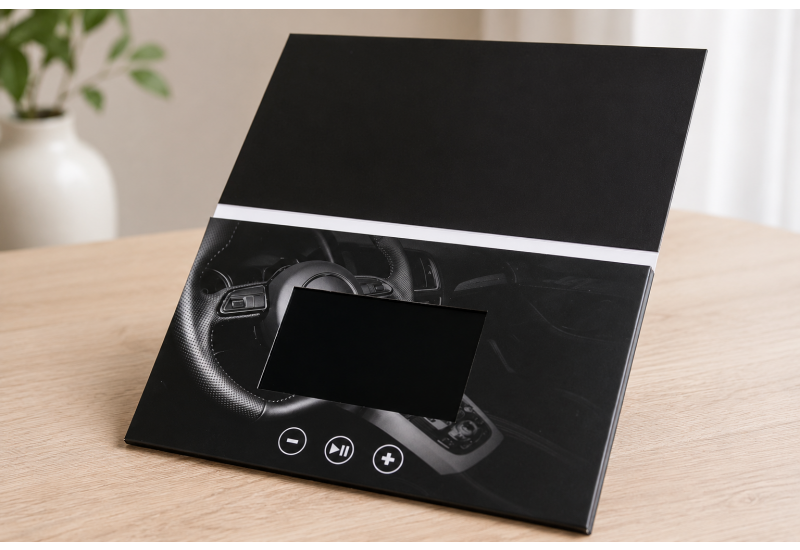
A video brochure is a printed marketing piece with a built-in screen, speaker, battery, and preloaded video content. Instead of asking a recipient to scan a code, open a browser, or click through an email sequence, a digital video brochure delivers the campaign message inside a tactile branded format.
For campaign teams, the value is practical. A video brochure combines print, packaging, video, and direct response into a single controlled presentation. It gives sales teams, event marketers, fundraisers, and brand managers a physical asset that introduces the message, explains the offer, and supports a clear next step.
How A Digital Video Brochure Works
A digital video brochure uses printed collateral as the outer presentation format and embedded video hardware to deliver the message. When the recipient opens the brochure, the screen activates and plays the preloaded video. Some formats include play, pause, volume, replay, and video-selection buttons.
Core components include a custom-printed cover, interior panels, an LCD screen, a built-in speaker, a rechargeable battery, internal memory, control buttons, and a charging port. The recipient opens the brochure, watches the message, reviews the printed details, and follows the campaign call to action. No app, Wi-Fi connection, login, or search step is required.
Reduced friction is the main operational advantage. The campaign team controls the first viewing experience instead of sending the recipient into a crowded digital environment.
Our broader custom video brochure category shows how the format adapts to meet quick-turn, value, and custom presentation needs. That flexibility matters when a campaign has to match a specific audience, timeline, and level of presentation.
What Makes a Video Brochure Different from a Standard Brochure?
A standard brochure relies on static copy, design, photography, and layout. It works when the offer is straightforward, and the reader only needs key information.
A video brochure adds demonstration and narration. It’s stronger when the message needs movement, sound, proof, or emotional context. A technology company shows a product walkthrough. A university presents a campus story. A healthcare brand explains a complex program. A luxury brand introduces a premium product with stronger presentation value.
Dayton Children's Hospital put this to work. The hospital used a 4.3-inch video screen brochure to introduce a new pediatric facility to referring physicians, mailing 280 pieces that reached an estimated 700 people. Physician referrals to the new facility rose 80%, and the events manager called the format a powerful tool for hard-to-reach audiences.
The printed section should include the headline, proof points, offer details, a QR code, a contact path, and next-step instructions. The video should carry the explanation, story, demonstration, or executive message.
For campaigns that need a more interactive presentation, formats such as pop-up mailers also support dimensional engagement. The difference is the job of the format. Pop-up mailers create surprise through structure and movement, while video brochures add screen-based storytelling to the tactile experience.
How Video Brochures Support Direct Mail Performance
Direct mail still plays a measurable role when the audience, offer, list quality, creative, and follow-up plan are properly aligned. A 2024 direct mail report citing Data & Marketing Association response-rate data reported average direct mail response rates of 2.7% to 4.4%, compared with 0.12% for email and 0.08% for social media. Actual campaign results still depend on targeting, list quality, creative, offer strength, and follow-up execution.
Video brochures strengthen the format by giving recipients something to watch, hold, and revisit. That combination supports brand recall, especially when the recipient is comparing options or presenting the idea internally. Our work with the First Bank of Greenwich shows what that looks like in practice. The bank sent a 4.3-inch video brochure as a thank-you to its top customers and saw a 92% response rate. CEO Frank Gaudio valued how the format let the bank speak directly to each customer, and recipients asked where they could get a video brochure of their own.
The strongest campaigns don’t treat video brochures as novelty pieces. They use them as campaign tools with a clear role:
-
Earn attention from a specific audience
-
Explain the offer quickly
-
Make the brand feel more considered
-
Support sales follow-up
-
Direct the recipient to a measurable next step
Our video brochure buyer’s guide is a useful next stop for teams comparing screen size, sound, message fit, and format options before production.
What to Include in a Video Brochure Campaign
The video should be short, focused, and aligned with the decision the recipient needs to make. For a sales campaign, the video introduces the problem, explains the solution, and invites a meeting. For an event campaign, it previews the experience, introduces speakers, and drives registration. For a donor campaign, it shows impact, connects the story to the ask, and directs the viewer to a giving page.
The printed copy shouldn’t repeat the video word for word. Use the panels for a clear headline, short supporting copy, campaign proof points, product or service details, QR code, personalized URL, contact information, and one focused CTA. One video, one message, and one next action create a clearer campaign path than a crowded presentation with too many competing asks.
How to Measure a Video Brochure Campaign
A video brochure should be measured like a campaign asset, not a branded gift. Useful performance indicators include confirmed delivery, QR code scans, personalized URL visits, landing page conversions, booked meetings, event registrations, donation responses, sales pipeline influenced, and follow-up engagement from target accounts.
The campaign needs a trackable response path before production starts. A brochure that impresses the recipient but gives no measurable next step creates a reporting gap.
Simple measurement tools work well: campaign-specific landing pages, QR codes, unique phone numbers, offer codes, CRM tagging, and sales follow-up notes. The goal is to connect the physical impression to a business outcome.
The Mount Vernon Ladies Association did exactly that. The organization sent a 7-inch HD video-screen brochure to donors and credits the campaign with $2.5 million in donations, a result that traditional mail would have struggled to match.
What to Check Before Ordering a Video Brochure
Before placing an order, confirm the audience, message, format, video file, print design, fulfillment timing, and follow-up process.
Start with the audience. Video brochures work best for selected recipients where the campaign value justifies the production cost. Then define the piece's job. Is it meant to secure meetings, support a product launch, drive event attendance, strengthen donor engagement, or equip a sales team?
Next, check the video. A generic brand reel is weaker than a campaign-specific message. The video should explain why the recipient is receiving the piece and what action should follow. Quick-turn options help when a team needs a premium presentation for a launch, event, trade show, or sales push without a long production cycle. A product such as the 10.1-inch video-screen brochure demonstrates how screen size, playback, and presentation format affect the viewing experience.
Final Takeaway
A video brochure is a premium direct mail format that combines a printed presentation with a preloaded video. It works best when a campaign needs more than a postcard, an email, or a standard brochure to convey the message and prompt follow-up.
A digital video brochure won’t rescue weak targeting or unclear messaging. It becomes effective when the audience is carefully selected, the video is focused, the print supports the message, and the CTA leads to a measurable next step.
Ready to put a video brochure to work in your next campaign? Explore our custom video brochures or request a sample to feel the format in your hands.
Frequently Asked Questions
What Is a Video Brochure Used For?
A video brochure is used for campaigns that need visual explanation, premium presentation, and a physical follow-up asset. Common uses include sales outreach, product launches, donor campaigns, event follow-up, and account-based marketing.
How Does a Video Brochure Play the Video?
The video is preloaded into the brochure’s internal memory. When the recipient opens the piece, the built-in screen and speaker play the content without needing Wi-Fi, an app, or an external device.
Are Video Brochures Good for B2B Campaigns?
Yes. They make sense for B2B campaigns with selective recipient lists, complex offers, and a clear sales follow-up path.
What Should a Video Brochure Include?
A strong video brochure should include a focused video, a clear printed message, campaign proof points, a contact path, and one direct CTA.
How Do You Track Results from a Video Brochure?
Results can be tracked with QR codes, personalized URLs, campaign landing pages, unique phone numbers, offer codes, CRM tagging, and sales follow-up records.